Share your look
A short video or a photo of our watch face on your wrist.
⌚ On ·
By sending, you confirm it’s your own video or photo and that we may show it on Garmin Face Hub and our social media. Terms
Preparing…
Keep this page open.
Loading…
About this watch face
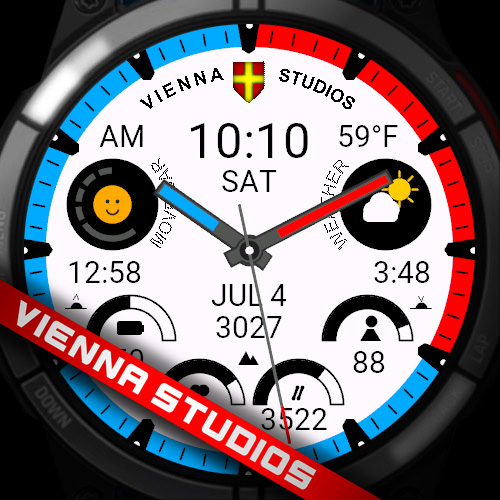
Analog watch face with an outer minute ring, hour ticks, a dive-style arc, and up to three configurable data fields. Hour and minute hands carry a colored lume strip; an optional sweeping second hand runs on top. Weather icon, temperature, Body Battery, steps, heart rate and a phone-connection dot round out the dial.
Settings
Watch Color — dial/base color, 20 choices.
Ring Color — outer minute ring, 20 choices.
Dive Arc Color — accent arc, 20 choices.
Dive Arc End — where the arc stops: 3 to 9 o’clock.
Dark Theme — on/off, inverts the palette.
Data Over Hands — on/off; on = hands sit under the data, off = hands sweep over it.
Second Hand OFF/ON — show or hide the second hand (default on).
Hour Tick Lume — tick-mark color, 20 choices.
Second Tip Color — second-hand tip, 10 choices.
Minute Hand Lume — minute-hand strip, 10 choices.
Hour Hand Lume — hour-hand strip, 10 choices.
Data A / Data B / Data C — each field independently: Off, Heart Rate, Calories, Distance, Active Minutes, Notifications, Sunrise, Sunset, Altitude, Floors Climbed, Stress, Pulse Ox.
Military Time — 24-hour clock on/off.
Details
- Downloads
- 100+
- Rating in Connect IQ
- 5.0 ★ (1)
- Version
- 1.5
- Updated
- 5 Oct 2026
Comments 0