
Share your look
A short video or a photo of our watch face on your wrist.
⌚ On ·
By sending, you confirm it’s your own video or photo and that we may show it on Garmin Face Hub and our social media. Terms
Preparing…
Keep this page open.
Loading…
About this watch face
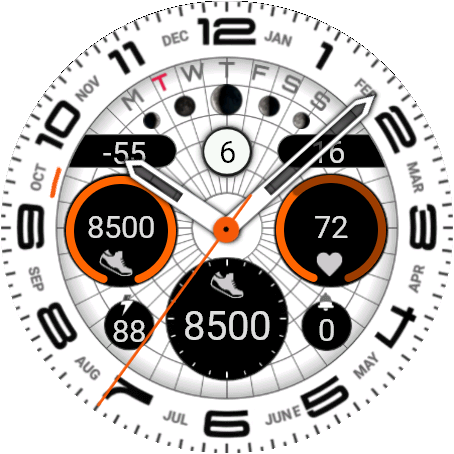
Ultra Watch is an elegant analog watch face for Garmin devices that blends a classic dial look with the data depth of a modern smartwatch. Two progress-ring complications, three fully customizable data widgets, and a clean, legible design — all packed into a face that supports 40+ Garmin models across four screen sizes, with Always-On Display support.
Core Watch Face
Analog hour and minute hands — 3 style options, 3 colors (White / Grey / Orange)
Second hand — 2 styles, or turn it off entirely
Background color — 2 options (White & Black)
Day of month, day-of-week letters, a rotating month indicator dial, and moon phase — always visible
Full Always-On Display support
Left / Right Complication Ring — two independent progress rings, each showing a live fill-percentage arc, an icon, and the current value. Choose independently from 10 metrics per ring:
Steps, Calories, Heart Rate, Distance, Humidity, Body Battery, Floors Climbed, SPO2, Stress, Watch Battery
Ring color is customizable independently for each side (5 color options).
Top Left / Top Right Complication — two compact widgets near the top of the face, each with its own icon and live value, selectable from 17 metrics — or turn either one off completely with the “OFF complication” option for a minimal look:
Altitude, Humidity, UV Index, Chance of Rain, Weather (temperature), Wind, Active Minutes, Body Battery, Calories, Distance, Floors Climbed, Heart Rate, Respiration Rate, Time to Recovery*, SPO2, Stress, VO2max
Bottom Complication — a central widget with its own dedicated icon set, selectable from 16 metrics:
Altitude, Humidity, Weather, Wind, Active Minutes, Body Battery, Calories, Distance, Floors Climbed, Heart Rate, Respiration Rate, Time to Recovery*, SPO2, Steps, Stress, VO2max
More
Small battery/notification indicator at the top (toggle between Battery and Body Battery)
Notification count
Date color — 5 options
Tap directly on the face to jump straight into Calendar, Notifications, or Body Battery
Smart compatibility — the watch face automatically detects which Garmin health metrics your specific device supports and hides unavailable ones from the settings menu — no confusing options that don’t work on your model, just the metrics that actually apply to you.
*Time to Recovery is only available on devices that support this Garmin feature.
Details
- Downloads
- 100+
- Rating in Connect IQ
- 4.3 ★ (19)
- Version
- 1
- Updated
- 14 Sep 2026
Comments 0