
Share your look
A short video or a photo of our watch face on your wrist.
⌚ On ·
By sending, you confirm it’s your own video or photo and that we may show it on Garmin Face Hub and our social media. Terms
Preparing…
Keep this page open.
Loading…
About this watch face
-=-=-=-=-=-=-=-=-=-=-=-=-=-=-=-=-=-=-=-=-=
#### ! ! ! ! ! ! ACTIVATION ! ! ! ! ! ! ####
-=-=-=-=-=-=-=-=-=-=-=-=-=-=-=-=-=-=-=-=-=
The watch face includes a 10-minute free trial.
After the trial expires, your unique 6-character Device ID will be displayed on the watch face.
To unlock the watch face:
https://ko-fi.com/s/b6861dcc26
1. After your purchase, you will receive an activation email from JCSwatchfaces.
2. Open the email and click the red ACTIVATE WATCH FACE button.
3. On the activation page, enter the 6-character Device ID displayed on your watch face.
4. Your personal activation code will be generated instantly and displayed on the activation page.
5. Enter this activation code in the watch face settings to permanently unlock the watch face.
Enter the Device ID exactly as shown on your watch face. No screenshot or email reply is required.
Activation is linked to your Garmin device and each purchased license can be activated once.
-=-=-=-=-=-=-=-=-=-=-=-=-=-=-
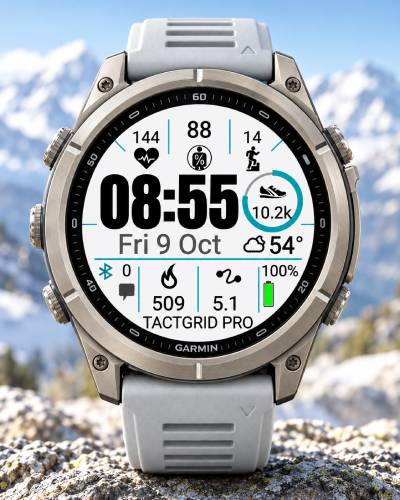
TACTGRID PRO combines a modern tactical design with high readability, extensive customization and a clear, functional layout.
The watch face provides 6 configurable data areas — 5 standard data fields plus 1 additional value displayed inside the 360° progress ring.
The large central time display remains easy to read, while the surrounding data areas provide quick access to important activity, health and training information.
Main features:
– 6 configurable data areas
– 5 standard customizable data fields
– 1 additional data value inside the 360° progress ring
– Configurable 360° progress ring
– Customizable background color
– Separate colors for time, date, data and accents
– 12-hour and 24-hour time formats
– Optional leading zero
– Custom text
– AMOLED Always-On Display support
– Optimized layouts for multiple Garmin display sizes
– Clean, battery-conscious design
– High readability during everyday use and training
Available data options include:
– Heart Rate
– Steps
– Calories
– Distance
– Body Battery
– Stress
– Floors
– VO2 Max
– Pulse Ox
– Recovery Time
– Intensity Minutes
– Weekly Running Distance
– Weekly Cycling Distance
– Pressure
– Precipitation
The 360° progress ring can be configured independently, allowing you to choose the metric that matters most to you and display its current value directly inside the ring.
TACTGRID PRO gives you extensive control over the appearance of the watch face. You can create anything from a minimal monochrome layout to a more distinctive high-contrast design by changing the background, time, date, data and accent colors independently.
The watch face is designed to provide a balance between functionality, customization and readability, without unnecessary visual clutter.
Details
- Downloads
- 10+
- Version
- 1.0
- Updated
- 29 Oct 2026
Works on
Garmin Fenix 9 · Garmin Fenix 8 · Garmin Fenix E · Garmin Fenix 7 · Garmin Epix Pro · Garmin Epix Gen 2 · Garmin Forerunner 970 · Garmin Forerunner 965 · Garmin Forerunner 955 · Garmin Forerunner 570 · Garmin Forerunner 265 · Garmin Forerunner 255 · Garmin Forerunner 170 · Garmin Forerunner 165 · Garmin Forerunner 70 · Garmin Venu 4 · Garmin Venu 3 · Garmin Venu 2 · Garmin Vivoactive 6 · Garmin Vivoactive 5 · Garmin Instinct 3 · Garmin Instinct Crossover · Garmin Enduro 3 · Garmin Enduro 2 · Garmin Tactix 8 · Garmin Tactix 7 · Garmin MARQ Gen 2 · Garmin D2 Mach · Garmin D2 Air X · Garmin Descent Mk3 · Garmin Descent G2 · Garmin Approach S70 · Garmin Approach S50
Comments 0