Share your look
A short video or a photo of our watch face on your wrist.
⌚ On ·
By sending, you confirm it’s your own video or photo and that we may show it on Garmin Face Hub and our social media. Terms
Preparing…
Keep this page open.
Loading…
About this watch face
Purchase & permanent activation:
https://watch.jiaji.ca/watchfaces/strata/
STRATA / SIX TRENDS. ONE SIGNATURE.
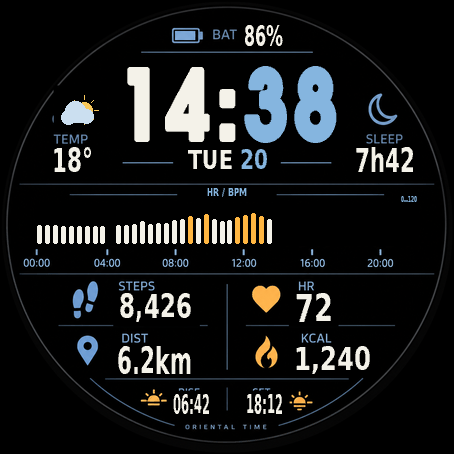
Calm ice blue. Decisive warm orange. Bold time and layered information give your day a clear visual rhythm. STRATA is a round color watch face by Oriental Time for compatible Garmin watches.
CHOOSE YOUR FOCUS
Select one of six center charts in settings: observed steps, heart rate, stress, Body Battery, elevation or observed calories. The title, units and vertical range follow your choice. The local-day timeline runs from 00:00 to 24:00 in 48 half-hour bins. Future and missing bins stay empty.
THE DAY, AT A GLANCE
Time, date, battery, synced weather, steps, heart rate, distance, calories, sunrise/sunset and manually entered sleep minutes, arranged in a layered layout. Metric/imperial units and a forced 24-hour option are available.
QUIET. STILL STRATA.
A dedicated always-on layout retains time, date, battery and heart rate. It uses pixel shifts and alternating dark rows; the center chart is not shown in AOD. Always-on requires device and system support. Brightness and appearance depend on your device.
SETUP
Phone: Connect IQ → this watch face → Settings → Chart data.
Watch: open this face’s settings menu → Chart data → choose a metric.
The selection persists. Phone settings support English, Simplified Chinese and Traditional Chinese. Watch-face labels and the on-watch menu are in English.
TRIAL AND ACTIVATION
A 1-hour trial is included. Continued use after the trial requires permanent activation.
Install and open the face once, then copy the full Install ID from settings. Contact the author through the website or details below to obtain activation information. Enter your permanent activation code in settings and save.
Consult the author’s current information for price and purchase details. No price is specified in this listing text.
DATA NOTES
• Observed steps and calories capture differences between consecutive valid device readings while this face is running. The first reading establishes a baseline. Gaps over 3 minutes, counter decreases or clock rollback reset that baseline. Missing periods are not backfilled. These charts cover successfully observed periods and are not exact whole-day segmented totals.
• Calories use the device’s total daily kcal, including its resting component, rather than active calories alone.
• Heart rate, stress, Body Battery and elevation charts show half-hour means of available valid device history samples. Availability depends on model, firmware, wear and recording. The selected sensor chart uses an approximately 5-minute cache; changing mode or units triggers a refresh. History traversal is capped at 1,800 samples, which may limit the visible period on some devices.
• Unsupported or unavailable data remain empty or show NO DATA. Chart colors are visual cues, not medical guidance.
• SLEEP is a manual minutes setting. It does not automatically read last night’s sleep. Zero displays –.
• Temperature comes from synced weather, not wrist temperature. Weather and sun times depend on available device data and location settings; manual coordinates are available.
• Campaign images combine source-rendered watch-face screens with designed backgrounds. Values are illustrative; images are not physical-watch photographs. Rendering, brightness and available data vary by device.
COMPATIBILITY
Use the compatible-device list shown for this app in Connect IQ. Some models do not expose every history metric. Please use the trial to confirm appearance and data availability on your watch before activation.
ORIENTAL TIME
Website: https://watch.jiaji.ca
WeChat: CyberTecher2026
LINE: CyberTecher2026
Details
- Downloads
- 1+
- Version
- 1.0.1
- Updated
- 26 Oct 2026
Works on
Garmin Fenix 9 · Garmin Fenix 8 · Garmin Fenix E · Garmin Epix Pro · Garmin Epix Gen 2 · Garmin Forerunner 970 · Garmin Forerunner 965 · Garmin Forerunner 570 · Garmin Forerunner 265 · Garmin Forerunner 170 · Garmin Forerunner 165 · Garmin Forerunner 70 · Garmin Venu 4 · Garmin Venu 3 · Garmin Venu 2 · Garmin Vivoactive 6 · Garmin Vivoactive 5 · Garmin Instinct 3 · Garmin Instinct Crossover · Garmin Tactix 8 · Garmin Tactix 7 · Garmin MARQ Gen 2 · Garmin D2 Mach · Garmin D2 Air X · Garmin Descent Mk3 · Garmin Descent G2 · Garmin Approach S70 · Garmin Approach S50
Comments 0