
Share your look
A short video or a photo of our watch face on your wrist.
⌚ On ·
By sending, you confirm it’s your own video or photo and that we may show it on Garmin Face Hub and our social media. Terms
Preparing…
Keep this page open.
Loading…
About this watch face
BEFORE BUYING, PLEASE NOTE THAT A WHITE WATCH FACE MAKES THE BLACK BEZEL AROUND YOUR DISPLAY MORE NOTICEABLE!
◆ FEATURE REQUEST OR ISSUE? Email us first at support@tikks.io. Emails reach us directly, while reviews can be missed and don’t allow a conversation.
◆ Custom colors: https://tikks.io/colors/ ◆ Details: https://tikks.io/watch-faces/retro-watt/
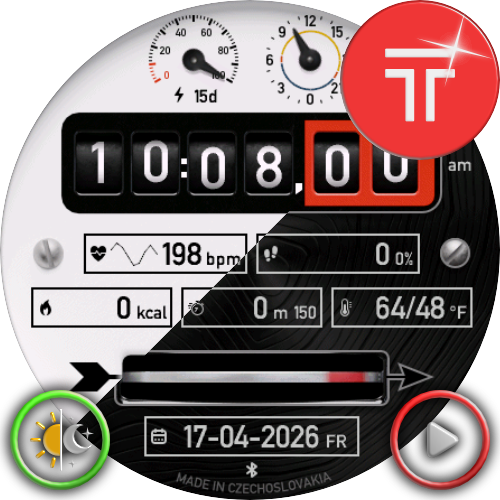
RetroWatt is a battery-optimized retro-inspired watch face for Garmin AMOLED devices, designed from the ground up for low power consumption with every element carefully optimized for efficiency, readability, and full-featured daily use.
◆ FEATURES
• Retro industrial-inspired design
• Light and dark theme
• Full AOD mode
• Optional analog or digital indicators
• Theme switching directly on the clock via touch and hold
• Complication launch support via touch and hold
• 3 Animation modes: Once on wake (default) / Loop / Off
• Designed for a balanced mix of battery life and up-to-date data
• Connect IQ settings let you offset the displayed time by a set number of minutes. Alarms are unaffected.
◆ DATA FIELDS
Displayed data is now configured only on the watch.
Supports a wide range of data, depending on device capabilities:
• Steps
• Heart rate
• Battery
• Date
• Seconds
• 24h indicator
• Steps to goal
• Calories
• Distance
• Floors
• Move bar
• Active minutes today / week
• Body Battery
• Stress
• Pulse Ox
• Respiration
• Recovery
• VO2 Max (run / bike)
• Week number
• Alternate time zone
• Notifications
• Calendar
• Weekly running distance
• Weekly cycling distance
• Training status
• Altitude
• Temperature
• Feels like temperature
• Precipitation
• Humidity
• Wind
• UV index
• Pressure
• Sunrise / sunset
• Dawn / dusk
• Moon phase
• Solar input
• Weekly running time*
• Weekly cycling time*
* based on activities stored on the watch
◆ WEATHER
• OpenWeatherMap integration (optional)
• Personal API key required in phone settings
• API key: https://openweathermap.org/api
• Select OpenWeatherMap as the weather source
◆ INTERACTION
• Switch theme directly on the clock area with touch and hold
• Launch supported complications with touch and hold
• Flexible layout with selectable analog or digital indicators
◆ AOD
• Full Always-On Display mode
• Optimized for AMOLED devices
• Built to preserve readability while minimizing power usage
◆ NOTES
• Available functions may vary by device and sensor support
• Some weather features require proper OpenWeatherMap setup
• Under active development
◆ SUPPORT
• Ratings are appreciated
• If necessary, please contact support before leaving a negative review
retro, vintage, industrial, dashboard, instrument panel, hybrid, analog, digital, data-rich, info-rich, customizable, AMOLED, full AOD, always-on display, low power, battery efficient, optimized, weather, OpenWeatherMap, heart rate, HR, steps, Body Battery, stress, Pulse Ox, respiration, recovery, VO2 max, altitude, pressure, UV, wind, humidity, temperature, sunrise, sunset, dawn, dusk, moon phase, solar, complications, touch launch, Garmin
Details
- Downloads
- 100+
- Rating in Connect IQ
- 4.3 ★ (18)
- Version
- 1.4.0
- Updated
- 22 Oct 2026
Works on
Garmin Fenix 9 · Garmin Fenix 8 · Garmin Fenix E · Garmin Epix Pro · Garmin Epix Gen 2 · Garmin Forerunner 970 · Garmin Forerunner 965 · Garmin Forerunner 570 · Garmin Forerunner 265 · Garmin Forerunner 170 · Garmin Forerunner 165 · Garmin Forerunner 70 · Garmin Venu 4 · Garmin Venu 3 · Garmin Vivoactive 6 · Garmin Vivoactive 5 · Garmin Instinct 3 · Garmin Tactix 8 · Garmin Tactix 7 · Garmin MARQ Gen 2 · Garmin D2 Mach · Garmin D2 Air X · Garmin Descent Mk3 · Garmin Descent G2 · Garmin Approach S70 · Garmin Approach S50
Comments 0