
Share your look
A short video or a photo of our watch face on your wrist.
⌚ On ·
By sending, you confirm it’s your own video or photo and that we may show it on Garmin Face Hub and our social media. Terms
Preparing…
Keep this page open.
Loading…
About this watch face
-=-=-=-=-=-=-=-=-=-=-=-=-=-=-=-=-=-=-=-=-=
#### ! ! ! ! ! ! ACTIVATION ! ! ! ! ! ! ####
-=-=-=-=-=-=-=-=-=-=-=-=-=-=-=-=-=-=-=-=-=
The watch face includes a 10-minute free trial.
After the trial expires, your unique 6-character Device ID will be displayed on the watch face.
To unlock the watch face:
https://ko-fi.com/s/78df631a4d
1. After your purchase, you will receive an activation email from JCSwatchfaces.
2. Open the email and click the red ACTIVATE WATCH FACE button.
3. On the activation page, enter the 6-character Device ID displayed on your watch face.
4. Your personal activation code will be generated instantly and displayed on the activation page.
5. Enter this activation code in the watch face settings to permanently unlock the watch face.
Enter the Device ID exactly as shown on your watch face. No screenshot or email reply is required.
Activation is linked to your Garmin device and each purchased license can be activated once.
-=-=-=-=-=-=-=-=-=-=-=-=-=-=-
NineSTYLE – MIP & AMOLED
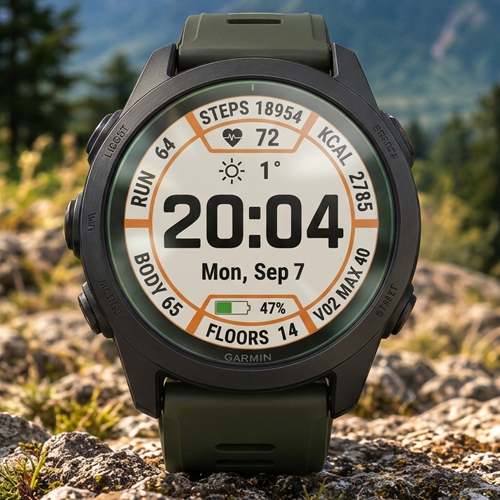
A clean, modern and highly customizable watch face inspired by the original Garmin designs found on flagship multisport watches.
Designed for both MIP and AMOLED displays, NineSTYLE combines a functional layout, excellent readability and extensive personalization options.
Whether you prefer a classic white background with bold orange accents, a sleek dark theme or your own unique color combination, NineSTYLE lets you create a look that matches your style.
Full Color Customization
Personalize your watch face with independent color settings for:
Background – Choose your preferred background color.
Text & Icons – Customize the color of text and icons together.
Accents – Personalize progress rings, bars and other visual highlights.
Available colors include Light Gray, Dark Gray, Black, Red, Dark Red, Orange, Yellow, Green, Dark Green, Blue, Dark Blue, Purple and Pink.
Create your own color combinations for a personalized look on both MIP and AMOLED watches.
Optimized for Performance & Battery Life
Built with optimized code and low CPU usage to minimize power consumption while maintaining smooth performance and battery efficiency.
Designed to deliver a responsive experience without unnecessary background processing.
Fully Customizable Data Fields
Customize the watch face to match your training and everyday needs with 9 configurable data areas:
Top Arc (Slot 1): Steps | Weekly Run Distance | Calories
Upper-Right Arc (Slot 2): Calories | Pulse Ox | Stress
Lower-Right Arc (Slot 3): Body Battery | Time to Recovery | Steps
Bottom Arc (Slot 4): Floors Climbed | Weekly Bike Distance | Altitude
Lower-Left Arc (Slot 5): Stress | VO2 Max | Body Battery
Upper-Left Arc (Slot 6): Distance Today | VO2 Max | Weekly Run Distance
Top Center Bar: Solar Intensity | Battery | Heart Rate | Time to Recovery | VO2 Max
Bottom Center Bar: Notifications | Heart Rate | VO2 Max | Battery
Center Data Field: Sunrise & Sunset | Weather
Key Features
MIP & AMOLED support: Optimized layouts for both display technologies.
AMOLED Always-On Display (AOD): Dedicated low-power display mode that keeps essential information visible when the watch is inactive.
Garmin-inspired design: Clean, functional aesthetics inspired by modern Garmin multisport watches.
Independent color customization: Separate color settings for background, text & icons, and accents.
9 configurable data areas: Personalize the information displayed according to your needs.
Flexible time format: Option to display the time with or without a leading zero.
Optimized performance: Efficient code designed for low CPU usage and reduced battery consumption.
Excellent readability: Clear information hierarchy and high-contrast color combinations.
Personalized appearance: Create anything from a classic Garmin-style look to a unique custom theme.
Details
- Downloads
- 100+
- Rating in Connect IQ
- 4.5 ★ (11)
- Version
- 1.4
- Updated
- 27 Oct 2026
Works on
Garmin Fenix 9 · Garmin Fenix 8 · Garmin Fenix E · Garmin Fenix 7 · Garmin Fenix 6 · Garmin Epix Pro · Garmin Epix Gen 2 · Garmin Forerunner 970 · Garmin Forerunner 965 · Garmin Forerunner 955 · Garmin Forerunner 570 · Garmin Forerunner 265 · Garmin Forerunner 255 · Garmin Forerunner 170 · Garmin Forerunner 165 · Garmin Forerunner 70 · Garmin Venu 4 · Garmin Venu 3 · Garmin Venu 2 · Garmin Vivoactive 6 · Garmin Vivoactive 5 · Garmin Instinct 3 · Garmin Instinct Crossover · Garmin Enduro 4 · Garmin Enduro 3 · Garmin Enduro 2 · Garmin Tactix 8 · Garmin Tactix 7 · Garmin MARQ Gen 2 · Garmin D2 Mach · Garmin D2 Air X · Garmin Descent Mk3 · Garmin Descent G2 · Garmin Approach S70 · Garmin Approach S50
Comments 1
🔥 Love this