
Share your look
A short video or a photo of our watch face on your wrist.
⌚ On ·
By sending, you confirm it’s your own video or photo and that we may show it on Garmin Face Hub and our social media. Terms
Preparing…
Keep this page open.
Loading…
About this watch face
Description
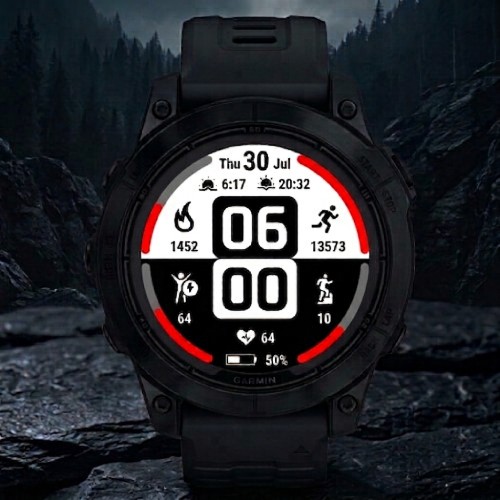
MonoSplit MIP PRO is an advanced digital watch face designed specifically for Garmin MIP (Memory-in-Pixel) displays. Built with a strong focus on efficiency, readability, and customization, it delivers an exceptional user experience while maintaining extremely low battery consumption.
Thank you for downloading! If you enjoy this watch face, please consider leaving a 5-star review.
-=-=-=-=-=-=-=-=-=-=-=-=-=-=-=-=-=-=-=-=-=
### ! ! ! ! ! ! ! ACTIVATION ! ! ! ! ! ! ! ###
-=-=-=-=-=-=-=-=-=-=-=-=-=-=-=-=-=-=-=-=-=
https://ko-fi.com/s/8a72cf2d6f
After purchase, you will receive an activation email from JCSwatchfaces.
1. Open the watch face on your Garmin device and find the unique 6-character Device ID displayed on the watch face.
2. Open the activation email and click the red ACTIVATE WATCH FACE button.
3. On the activation page, enter your 6-character Device ID exactly as shown on the watch face.
4. Your personal activation code will be generated instantly and displayed on the activation page.
5. Enter the activation code in the watch face settings to permanently unlock all PRO features.
You do not need to reply by email or send a screenshot.
Each purchased license can be used to activate one Garmin device.
-=-=-=-=-=-=-=-=-=-=-=-=-=-=-=-=
### Future Development ###
-=-=-=-=-=-=-=-=-=-=-=-=-=-=-=-=
MonoSplit MIP PRO is now the primary version of the project and will continue to receive all future feature updates, improvements, optimizations, and customization options.
The free version will remain available in the Connect IQ Store and will continue to function normally. However, it will no longer receive new features and will be maintained only for compatibility and stability purposes.
-=-=-=-=-=-=-=-=-=-=-=-=
### Key Features ###
-=-=-=-=-=-=-=-=-=-=-=-=
* 6 Fully Customizable Data Fields – configure the layout to match your needs.
* 4 Dynamic Progress Arcs* – side bars visually track progress based on selected data field values.
* Advanced Color Customization – personalize progress arc colors as well as hour and minute digits.
* MIP Optimized – excellent visibility and contrast, even in direct sunlight.
* Optimized for Ultra-Low Battery Consumption.
-=-=-=-=-=-=-=-=-=-=-=-=-=-=-=-=-=
### Exclusive PRO Features ###
-=-=-=-=-=-=-=-=-=-=-=-=-=-=-=-=-=
* Further improved battery optimization for maximum efficiency.
* Additional personalization options, including several extra data field selections.
* Choice between 24-hour and 12-hour time formats.
* Choice between Celsius and Fahrenheit temperature units.
* Select between a black-and-white background theme and a full-black background theme*.
-=-=-=-=-=-=-=-=-=-=-=-=-=-=-=-=-=-=-=-=-=-=
### Available Custom Complications ###
-=-=-=-=-=-=-=-=-=-=-=-=-=-=-=-=-=-=-=-=-=-=
#### Top Complication
* Sunrise & Sunset
* Current Weather
* Barometric Pressure
* Solar Intensity
* Notification Count
* Moon Phase
* Active Minutes + Active Calories
* Altitude
#### Side Complication
* Calories Burned
* Body Battery
* Stress Level
* Step Counter
* Floors Climbed
* Wheelchair Pushes
* Daily Distance
* Weekly Running Distance
* Weekly Cycling Distance
#### Bottom Complication
* Heart Rate
* Min / Max Heart Rate
* VO2 Max **
* Pulse Ox (Oxygen Saturation)
* Recovery Time
NOTE:
* Certain features are automatically disabled on selected older watch models due to limited RAM and processor architecture to ensure stable performance.
** VO2 Max availability depends on Garmin device support. On some older models, such as the Forerunner 645, Fenix 5, Approach S60, and others, this data may not be available to Connect IQ watch faces, even though the watch itself supports VO2 Max.
Details
- Downloads
- 100+
- Rating in Connect IQ
- 4.4 ★ (5)
- Version
- 1.1
- Updated
- 5 Oct 2026
Comments 0