
Share your look
A short video or a photo of our watch face on your wrist.
⌚ On ·
By sending, you confirm it’s your own video or photo and that we may show it on Garmin Face Hub and our social media. Terms
Preparing…
Keep this page open.
Loading…
About this watch face
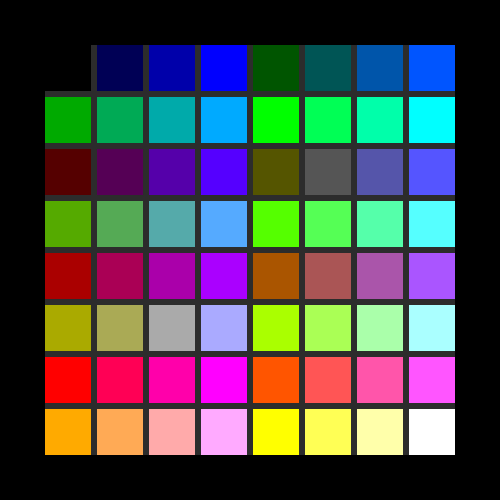
MIP Color Chart shows the 64 colors a Garmin MIP watch can actually display. MIP panels use RGB222: red, green, and blue each have four levels only, 00, 55, AA, and FF. The 8×8 grid is that full palette.
Select any cell to see its code, from A1 to H8, and its 6-digit hex value. Those are the values to use in a watch face.
UP and DOWN move through the colors. On a touch screen, tap a cell to select it, then tap it again for a closer look. START cycles through four pages: the grid, the color full screen, the color on a white background, and the color on a black background. BACK returns to the grid. From the grid, BACK closes the app.
The white and black pages draw the color as a block and as text, so you can check contrast before you commit to a hex value.
This is a device app. It does not replace your watch face, and it does not collect activity, location, or any other personal data.
Details
- Downloads
- 10+
- Version
- 1.0.0
- Updated
- 9 Oct 2026
Comments 0