Share your look
A short video or a photo of our watch face on your wrist.
⌚ On ·
By sending, you confirm it’s your own video or photo and that we may show it on Garmin Face Hub and our social media. Terms
Preparing…
Keep this page open.
Loading…
About this watch face
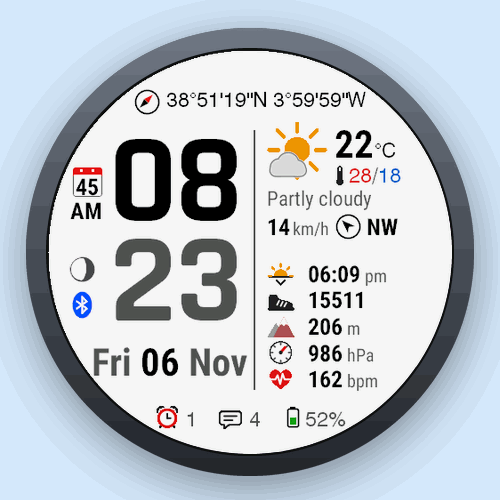
Isobar is a data-rich watch face for AMOLED Garmin watches: large, crisp time digits, the weather where you are, three to five data fields of your choice and your watch status at a glance.
WEATHER
• Condition icon with day and night variants, temperature and one detail of your choice: high/low, feels like, humidity, chance of precipitation, dew point or UV index
• Wind speed with a direction arrow, in km/h, m/s, mph, knots or Beaufort
• Weather from Garmin (sent by your phone), or from OpenWeatherMap with your own free API key: updates every 5 to 60 minutes, place names and descriptions in your language
DATA FIELDS
• Three, four or five fields with 33 choices (fewer fields get more space): next sunrise/sunset, sunrise, sunset, steps, steps and goal, distance, calories, floors, elevation gain, intensity minutes (day or week), heart rate, resting heart rate, Pulse Ox, Body Battery, stress, respiration, recovery time, VO2 max running or cycling, training status, weekly running or cycling distance, next calendar event, altitude, pressure, sensor temperature, humidity, chance of precipitation, feels like, UV index, dew point, solar input
• Pressure at sea level or ambient, in hPa, mbar, mmHg or inHg
AT A GLANCE
• Your position as coordinates (DMS, DMM, decimal degrees or MGRS) or as a place name
• Week number, moon phase, phone connection, Do Not Disturb, tones and vibration status
• Alarm and notification counts, battery in percent or days left, solar charging indicator
MAKE IT YOURS
• Light or dark theme, 18 soft colors each for hours, minutes, date and data values: eight hues in a stronger and a lighter tone, plus white and gray
• Three time sizes, five date formats, day and month names as on the watch, lowercase, UPPERCASE or Capitalized, sunrise and sunset under the date
• Change everything in the Connect IQ app or right on the watch
BUILT FOR AMOLED
• Dimmed, shifting always-on mode designed for Garmin’s AMOLED burn-in rules
LANGUAGES: English, Polish, Spanish, German and French.
GOOD TO KNOW
• Fields that need a sensor or feature your watch does not have (for example a barometer, Pulse Ox or solar charging) show “–“.
• OpenWeatherMap is optional and needs a free API key from openweathermap.org and a connected phone. Without it, Isobar shows the weather your phone sends to the watch.
PRIVACY: Isobar has no server and collects no data. Only if you turn on OpenWeatherMap, your position rounded to about 1 km, the language code and your API key are sent to OpenWeatherMap through your phone. Questions, ideas and bug reports are welcome.
Details
- Downloads
- 100+
- Rating in Connect IQ
- 4.7 ★ (9)
- Version
- 1.2.0
- Updated
- 8 Nov 2026
Works on
Garmin Fenix 9 · Garmin Fenix 8 · Garmin Fenix E · Garmin Fenix 7 · Garmin Epix Pro · Garmin Epix Gen 2 · Garmin Forerunner 970 · Garmin Forerunner 965 · Garmin Forerunner 955 · Garmin Forerunner 570 · Garmin Forerunner 265 · Garmin Forerunner 255 · Garmin Forerunner 170 · Garmin Forerunner 165 · Garmin Forerunner 70 · Garmin Venu 4 · Garmin Venu 3 · Garmin Venu 2 · Garmin Vivoactive 6 · Garmin Vivoactive 5 · Garmin Instinct 3 · Garmin Instinct Crossover · Garmin Enduro 4 · Garmin Enduro 3 · Garmin Enduro 2 · Garmin Tactix 8 · Garmin Tactix 7 · Garmin MARQ Gen 2 · Garmin D2 Mach · Garmin D2 Air X · Garmin Descent Mk3 · Garmin Descent G2 · Garmin Approach S70 · Garmin Approach S50
Comments 0