
Share your look
A short video or a photo of our watch face on your wrist.
⌚ On ·
By sending, you confirm it’s your own video or photo and that we may show it on Garmin Face Hub and our social media. Terms
Preparing…
Keep this page open.
Loading…
About this watch face
For another sleek and fully customizable experience, discover Dominus XSquare:
https://apps.garmin.com/apps/8f68c39b-cb1d-4946-bd37-6ffc50924055
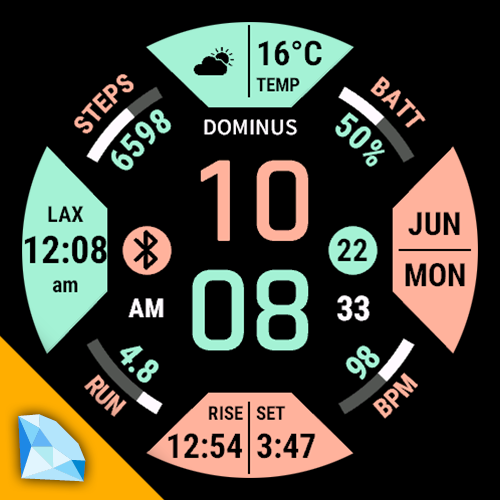
Dominus XCore is built around a striking geometric layout: four trapezoid fields frame a large central clock, four corner arcs track your daily progress, and two side dots keep status icons within reach. Clean lines, high contrast, and a layout that stays readable at a glance — on the trail, in the office, or on the golf course.
BEFORE PURCHASE – if you already use the free version, please read before upgrading to Premium:
Metric labels vs. icons — Premium lets you choose a text description for each metric (default) in trapezoids, or switch to icons in Display options if you prefer a more graphic look similar to the free version.
No combined metrics — Premium does not merge multiple values into one field. Layout is slightly different from free; metrics are shown individually!
Premium adds customization and flexibility — not a 1:1 copy of the free layout.
WHAT YOU GET: Upgrade for full control — every slot, every color, every detail.
Your data, your layout
Trapezoids — 54/57 x 2 metrics × 4 slots
Each of the four trapezoids can show any of 57 configurable fields — weather, temperature, humidity, wind, sunrise/sunset, barometer, moon phase, steps, distance, heart rate, body battery, stress, calories, training status, calendar, notifications, second time zone, date fields, weekly activity totals, and more. Enable two metrics per trapezoid for up to eight data fields around the dial (e.g. weather + temperature, sunrise + sunset). Prefer icons? Assign weather, moon phase, wind direction, or barometric trend as graphic icons.
Corner arcs — 21 metrics × 4 slots
Each corner supports 21 fitness and wellness fields — steps, steps to go, daily distance, floors, heart rate, calories, body battery, stress, recovery time, weekly run/bike/swim/walk distance and duration, battery, and more. Radial labels and progress arcs keep the corners informative without crowding the center.
Side dots — 21 options × 2 slots
Left and right dots each offer 21 choices — notification count, moon phase, weather icon, wind arrow, barometer trend, phone/Bluetooth status, DND, alarms, GPS, UV index, body battery, VO₂ max, sleep score, battery, date/week number, respiration, and other compact readouts.
Time that fits your style
Five premium bitmap time fonts (Tactic, Heavy, Organic, Condensed, Futuristic) or system default. Optional seconds, 12/24-hour support, and a custom logo line (up to 7 characters).
Colors without compromise
Independent color pickers for background, time digits, each trapezoid (fill and ink), corner arcs, side dots, and logo — with a rich palette from pure black and white to sport reds, neon accents, pastels, and earth tones.
Tap. Go.
Tap any trapezoid, corner, or dot to jump into the matching Garmin screen via native Complications shortcuts. The center clock has its own configurable tap target.
Always-On
• MIP: near-full face; seconds per setting/sleep.
• AMOLED burn-in: clock only, colours ~50% dim, centre jitter ±2 px each minute.
Built for modern Garmin watches
Optimized for 46 AMOLED and MIP models (Fenix, Forerunner, Epix, Venu, Approach, Descent, MARQ, and more). Adaptive always-on display. Optional high-refresh mode for smoother seconds (uses more battery).
Before you buy
• Weather, sunrise/sunset, and some fields require synced data from your phone or Garmin account.
• Tap shortcuts use Garmin Complications — availability may vary by device.
• Requires Connect IQ API 4.2.1+ (not compatible with Fenix 6 and older).
Still not sure: Try free version first:
https://apps.garmin.com/apps/896f3f35-0682-4e88-a401-09f47d72e969
If you already enjoy Dominus XCore — Free, this premium version is the same distinctive design — unlocked, refined, and ready to become your daily driver.
Details
- Downloads
- 1,000+
- Rating in Connect IQ
- 4.5 ★ (58)
- Version
- 1.4.1
- Updated
- 3 Nov 2026
Works on
Garmin Fenix 9 · Garmin Fenix 8 · Garmin Fenix E · Garmin Fenix 7 · Garmin Epix Pro · Garmin Epix Gen 2 · Garmin Forerunner 970 · Garmin Forerunner 965 · Garmin Forerunner 955 · Garmin Forerunner 570 · Garmin Forerunner 265 · Garmin Forerunner 170 · Garmin Forerunner 165 · Garmin Forerunner 70 · Garmin Venu 4 · Garmin Venu 3 · Garmin Venu X1 · Garmin Vivoactive 6 · Garmin Enduro 3 · Garmin Enduro 2 · Garmin Tactix 8 · Garmin Tactix 7 · Garmin MARQ Gen 2 · Garmin D2 Mach · Garmin D2 Air X · Garmin Descent Mk3 · Garmin Approach S70
Comments 0