
Share your look
A short video or a photo of our watch face on your wrist.
⌚ On ·
By sending, you confirm it’s your own video or photo and that we may show it on Garmin Face Hub and our social media. Terms
Preparing…
Keep this page open.
Loading…
About this watch face
— UPGRADE TO PREMIUM —
Want every slot, every color, and every metric unlocked? Get Dominus XCore — Premium:
https://apps.garmin.com/apps/e01f6896-104b-4b7c-b7cc-9528c802ac99
Same bold geometric design — fully configurable corners, side dots, premium time fonts, and 57 trapezoid fields per slot. Try this free edition first, then upgrade when you’re ready.
—
LAYOUT
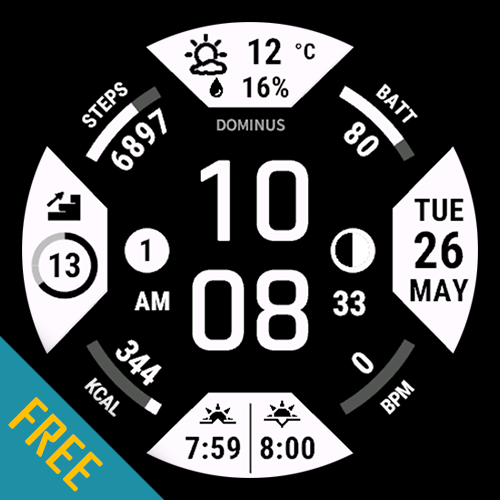
• Centre: hour + minute digits; optional seconds; 12 h / 24 h (system or override); optional AM/PM/24H marker.
• Four trapezoid panels (top / bottom / left / right): one complication type each; layouts differ by slot (horizontal vs vertical, multi-row weather/sun/stress, PNG icons).
• Four fixed corner arcs: STEPS vs goal, battery, active calories (ref. 3000), live HR (ref. 200).
• Battery arc: percent, estimated days remaining, or hybrid (e.g. 80 | 24).
• Optional notification dot (left), moon dot (right); optional logo text A–Z, max 7 characters.
COMPLICATIONS — set in Garmin Connect (4 slots × 33 types)
None · 2nd time zone · Date (full) · week / day-of-year / year · next event + alarm · notifications · solar · weather panel · temperature + feels like · hi/lo temperature · humidity + precipitation · wind · sunrise/sunset · pressure + trend · altitude + UV · moon phase · daily distance · floors · active min + active kcal · wheelchair pushes · weekly run / bike / swim / walk* · weekly active minutes · Body Battery · training + recovery · stress · Pulse Ox + respiration · VO₂ max run/bike · weight
2nd time zone: UTC offset presets (16 cities, incl. half-hour).
* Weekly run / bike / swim / walk: Minutes from native complication labels when available; otherwise summed from activity history on the watch. Run/bike distance uses native weekly complications; swim/walk distance uses activity history only.
TAP SHORTCUTS — touch watches, long press
11 zones: four trapezoids; four arc corners (steps, battery, calories, HR); centre clock; left/right dot. Per zone: 44 targets (notifications, weather, calendar, Body Battery, HR, steps, floors, intensity min, calories, battery, stress, sunrise/sunset, moon, date, forecast +1/+2/+3 days, weekday+date, altitude, pressure, weekly run/bike km, recovery time, VO₂ run/bike, training status, race predictor/pace 5K–marathon, Pulse Ox, respiration, solar, current/hi-lo temp, wheelchair pushes, last golf round, or none). Dots only if enabled in Display.
COLORS & UNITS — Garmin Connect
13 colour keys (10 swatches each): hour, minute, second, AM/PM, four trapezoids, two dots, arc label / progress / value. Temperature & distance: watch default, metric, or imperial.
DISPLAY
Toggles: time indicator, seconds, dots, logo. Battery arc mode. Steps display (today / to go). Logo string (Connect only, max 7). Optional faster refresh (uses more battery).
ON-WATCH CUSTOMIZE (Menu2)
Display + battery mode; time / trap / arc colours; clock format; units. Complications, tap map, and logo text are Connect-only (keeps menu responsive).
ALWAYS-ON
• MIP: near-full face; seconds per setting/sleep.
• AMOLED burn-in: clock only, colours ~50% dim, centre jitter ±2 px each minute.
DATA & PERMISSIONS
ActivityMonitor, SystemStats, Activity, ComplicationSubscriber, UserProfile, SensorHistory, Positioning. Sensor-specific fields show “–” when unavailable. Fallbacks if vector fonts, scaled bitmaps, or floorsClimbed missing.
Requires Connect IQ 4.2.1+ (drawRadialText, Complications API, System.getDisplayMode for AOD). Not compatible with Fenix 6 and older.
—
WHAT PREMIUM UNLOCKS
• Trapezoids — 57 metrics × 4 slots; optional two metrics per trapezoid (up to 8 fields)
• Corner arcs — 21 metrics × 4 slots (not fixed STEPS/BATT/KCAL/BPM)
• Side dots — 21 options × 2 slots
• Five premium bitmap time fonts + system default
• Independent colours for background, time, each trapezoid fill/ink, corners, dots, and logo
Upgrade now: https://apps.garmin.com/apps/e01f6896-104b-4b7c-b7cc-9528c802ac99
Details
- Downloads
- 1,000+
- Rating in Connect IQ
- 4.6 ★ (44)
- Version
- 2.0.6
- Updated
- 3 Nov 2026
Works on
Garmin Fenix 9 · Garmin Fenix 8 · Garmin Fenix E · Garmin Fenix 7 · Garmin Epix Pro · Garmin Epix Gen 2 · Garmin Forerunner 970 · Garmin Forerunner 965 · Garmin Forerunner 955 · Garmin Forerunner 570 · Garmin Forerunner 265 · Garmin Forerunner 170 · Garmin Forerunner 165 · Garmin Forerunner 70 · Garmin Venu 4 · Garmin Venu 3 · Garmin Venu X1 · Garmin Vivoactive 6 · Garmin Enduro 3 · Garmin Enduro 2 · Garmin Tactix 8 · Garmin Tactix 7 · Garmin MARQ Gen 2 · Garmin D2 Mach · Garmin D2 Air X · Garmin Descent Mk3 · Garmin Approach S70
Comments 0