
Share your look
A short video or a photo of our watch face on your wrist.
⌚ On ·
By sending, you confirm it’s your own video or photo and that we may show it on Garmin Face Hub and our social media. Terms
Preparing…
Keep this page open.
Loading…
About this watch face
◆ FEATURE REQUEST OR ISSUE? Email us first at support@tikks.io. Emails reach us directly, while reviews can be missed and don’t allow a conversation.
◆ Custom colors: https://tikks.io/colors/ ◆ Details: https://tikks.io/watch-faces/crosswind-mip/
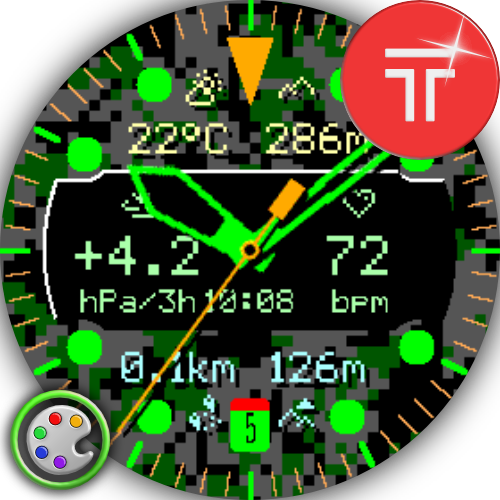
Crosswind MIP is a premium analog watch face for Garmin memory-in-pixel displays, with aviation-inspired styling and a distinctive retro digital display. Customize six data fields with 62 metrics, then fine-tune colors, hands, markers, layout, background, touch shortcuts and Always-on Seconds.
◆ FEATURES
• 3 hand styles with optional shadows
• Dark, Light, Dark Camo and Light Camo backgrounds
• Independent 18-color choices for main hands, seconds hand and hour, minute and 12 o’clock markers
• Standard or High Contrast Digital Window
• Six configurable fields: two at the top, two in the Digital Window and two at the bottom
• Top and bottom rows can show one field, two fields or remain hidden
• Four outer-data color layouts with two selectable colors
• Multifunctional 6 o’clock marker: date + battery, date, battery percentage, battery gauge or simple marker
• Digital Window Center: status icons, digital time, Zulu time, date or seconds
• Smart positioning moves Digital Window Center away from the hour and minute hands
• Complete data layer can appear above or below the hands
• Two alternate time zones, multiple time/date formats, optional AM/PM and +5 to +30-minute time offset
• Phone settings and extensive on-watch configuration
• Garmin Weather and optional OpenWeatherMap integration
◆ COMPLICATIONS & TOUCH
• Touch and hold a visible data area to launch its app or complication
• Automatic launch target based on the displayed metric
• Assign a custom Garmin complication to each of the six touch areas
• Touch launch can be disabled
◆ DATA FIELDS
All 62 available field types:
• Activity: steps, steps to goal, step goal progress, calories, active calories, active-calorie progress, distance, floors ascended/descended, meters climbed/descended, active day/week and Move Bar
• Health: heart rate, resting heart rate, Body Battery, stress, Pulse Ox, respiration and sleep score
• Training: recovery time, running/cycling VO2 Max, training status and weekly running/cycling distance and time
• Time & astronomy: month, date, week number, calendar, 24-hour time, seconds, two alternate time zones, sunrise/sunset, dawn/dusk, remaining daylight/darkness and moon phase
• Weather: conditions, feels-like and min/max temperature, precipitation chance, humidity, wind, UV, pressure, ground pressure, barometric trend, cloud cover, one-hour rain, gusts, visibility and dew point
• System: battery, remaining battery days, notifications, alarm count, altitude and solar input
Availability depends on the watch, sensors, firmware, Garmin API and weather source.
◆ WEATHER
• Garmin Weather support
• Optional OpenWeatherMap with 15, 30 or 60-minute refresh
• Personal OWM API key required in phone settings
• API key: https://openweathermap.org/api
• On-watch status, manual refresh and OWM cache controls
◆ ALWAYS-ON SECONDS
• In low-power mode, a circular seconds indicator around the bezel replaces the seconds hand
• Efficient partial updates redraw only the moving indicator area
• Battery Saver can disable Always-on Seconds at 5%, 10%, 15% or 20%
◆ NOTES
• Exclusively for supported Garmin MIP devices
• Some values require compatible Garmin complications
• Solar input requires a compatible solar watch
• Digital Window Center seconds are hidden in low-power mode
• Displayed time offset does not affect alarms
◆ SUPPORT
• https://tikks.io/support/
• Please contact support before leaving a negative review—we’ll do our best to help.
hybrid, analog, digital, retro, aviation, pilot, tactical, military, camo, complications, MIP, memory-in-pixel, AOS, Always-on Seconds, OpenWeatherMap, ZULU
Details
- Downloads
- 1+
- Version
- 1.1.0
- Updated
- 5 Oct 2026
Comments 0