
Share your look
A short video or a photo of our watch face on your wrist.
⌚ On ·
By sending, you confirm it’s your own video or photo and that we may show it on Garmin Face Hub and our social media. Terms
Preparing…
Keep this page open.
Loading…
About this watch face
◆ 24-HOUR TRIAL VERSION – NO PAYMENT IS REQUIRED in this version.
◆ FEATURE REQUEST OR ISSUE? Email us first at support@tikks.io. Emails reach us directly, while reviews can be missed and don’t allow a conversation.
◆ Custom colors: https://tikks.io/colors/ ◆ Details: https://tikks.io/watch-faces/ashborn-origin/
◆ PRO: https://apps.garmin.com/apps/b56ebee7-0221-46ae-bebd-b7959f2631f0
A salute to those who came before.
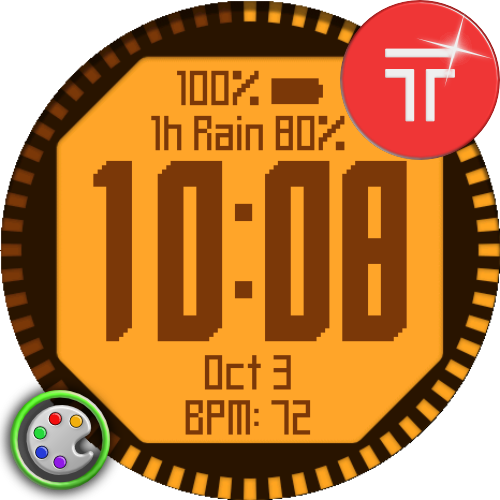
Ashborn Origin recreates the original Garmin fēnix and fēnix 2 watch face in pixel art.
◆ DESIGN & DATA
– Big Clock: up to 4 data fields.
– Medium Clock: up to 8 data fields.
– Fields auto-rearrange when set to None.
– 28 color schemes: LCD, terminal, early color, neon, modern.
– 6 color roles, 2 custom HEX colors, optional polygon background.
– Bezel progress: seconds, steps, battery, Body Battery or other metric.
– Hiding bezel progress expands clock/data to full screen.
– Bezel seconds: Fill / unfill, Fill and reset, Single segment.
– Optional seconds marker when bezel tracks another metric.
– 99 built-in metrics + installed Garmin complications.
– Pixel/system data font, optional units, scrolling long values.
◆ WEATHER & TIME
– Smart Weather: next enabled event; otherwise current weather.
– Optional triggers: weather change, high UV, strong wind, pressure drop, extreme temperature.
– Upcoming Weather: next forecast change.
– Fallback: range end, tomorrow or current weather.
– Forecast range: 1 / 3 / 6 h.
– Precipitation threshold: 30 / 40 / 50 / 60%.
– Wind: Auto, km/h, m/s, mph, knots.
– 2 alternate time zones: UTC−12:00 to UTC+14:00, 30-min steps.
– Custom TZ1/TZ2 labels up to 5 chars via Connect IQ.
– Separate main-clock/data-field time formats incl. Military time.
– 12 date formats.
– Medium Clock: small seconds or HH:MM:SS.
– Data-field seconds: 36 or :36.
◆ INFO SCREENS & SHORTCUTS
– Hold hours/minutes for separate info screens:
Heart rate, Steps, Weather, Run, Bike, Health, Activity, Outdoor.
– Graph + 5 summary rows per screen.
– Includes 7-day activity, hourly weather, HR ranges, Body Battery history, pressure trends and more.
– Duration: 2–10 s. Hold anywhere to close.
– Hold data fields to open supported Garmin apps with Touch shortcuts.
– On-watch appearance wizard: layout, fields, bezel, background, colors.
– Saves only at the end; leaving from step 1 cancels changes.
– Live color previews in on-watch settings.
– HEX colors/TZ labels entered in Connect IQ.
– On-watch User Guide QR code.
◆ GOALS, DISPLAY & POWER
– Custom goals: calories, distance, intensity minutes, floors descended, elevation gain/loss, weekly running/cycling distance & time.
– Steps/floors climbed use Garmin goals.
– AMOLED AOD: Full dashboard or Minimal clock/date; color or grayscale.
– Separate day/night and data brightness: 25–100%.
– Scheduling: sleep/wake, sleep/wake −2 h, sunrise/sunset, off.
– AMOLED AOD: black background; no polygon, seconds or animation.
– Pixel shifting reduces burn-in risk.
– MIP: full face in low power.
– Optional Always-On Seconds within partial-update power budget.
◆ COMPATIBILITY & DATA
– Garmin AMOLED and MIP watches.
– MIP uses nearest native colors.
– Metrics, weather, history and complications depend on device/firmware.
– Touch actions require touchscreen.
– Elevation yesterday/week/7-day totals build while Ashborn Origin is active.
– Garmin does not provide past days’ climbed/descended meters to watch faces.
◆ SUPPORT
– https://tikks.io/support/
Retro LCD watch face, pixel-art watch face, Garmin fēnix, fēnix 2, configurable data fields, 99 metrics, Smart Weather, Upcoming Weather, info screens, Garmin complications, alternate time zones, custom TZ labels, custom HEX colors, bezel progress, appearance wizard, AMOLED, MIP, AOD
Details
- Downloads
- 1+
- Version
- 1.1.0
- Updated
- 20 Oct 2026
Works on
Garmin Fenix 9 · Garmin Fenix 8 · Garmin Fenix E · Garmin Fenix 7 · Garmin Epix Pro · Garmin Epix Gen 2 · Garmin Forerunner 970 · Garmin Forerunner 965 · Garmin Forerunner 955 · Garmin Forerunner 570 · Garmin Forerunner 265 · Garmin Forerunner 255 · Garmin Forerunner 170 · Garmin Forerunner 165 · Garmin Forerunner 70 · Garmin Venu 4 · Garmin Venu 3 · Garmin Vivoactive 6 · Garmin Vivoactive 5 · Garmin Instinct 3 · Garmin Enduro 4 · Garmin Enduro 3 · Garmin Enduro 2 · Garmin Tactix 8 · Garmin Tactix 7 · Garmin MARQ Gen 2 · Garmin D2 Mach · Garmin D2 Air X · Garmin Descent Mk3 · Garmin Descent G2 · Garmin Approach S70 · Garmin Approach S50
Comments 0