Share your look
A short video or a photo of our watch face on your wrist.
⌚ On ·
By sending, you confirm it’s your own video or photo and that we may show it on Garmin Face Hub and our social media. Terms
Preparing…
Keep this page open.
Loading…
About this watch face
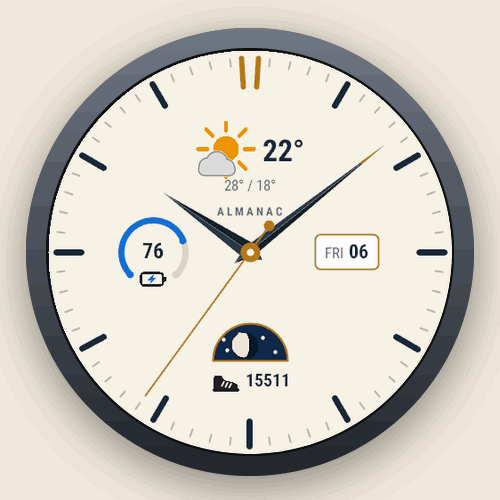
Almanac is a classic analog watch face for AMOLED Garmin watches, with the information a modern day needs: the weather at 12, a gauge at 9, the date at 3 and the moon phase with a data field of your choice at 6.
THE DIAL
• Faceted hands with an accent tip, applied hour indices, a minute track and a double index at 12
• Second hand while the screen is awake (can be turned off)
• Dark or ivory dial, five accent colors: gold, silver, blue, red or green
WEATHER AT 12
• Condition icon with day and night variants, temperature, high and low
• Weather from Garmin (sent by your phone), or from OpenWeatherMap with your own free API key: updates every 5 to 60 minutes
YOUR DATA
• Gauge at 9: Body Battery, stress, steps, floors, intensity minutes, heart rate, move bar or watch battery, with its progress toward your goal
• Data field at 6, with 33 choices: next sunrise/sunset, sunrise, sunset, steps, steps and goal, distance, calories, floors, elevation gain, intensity minutes (day or week), heart rate, resting heart rate, Pulse Ox, Body Battery, stress, respiration, recovery time, VO2 max running or cycling, training status, weekly running or cycling distance, next calendar event, altitude, pressure, sensor temperature, humidity, chance of precipitation, feels like, UV index, dew point, solar input
• Date window with the weekday and day, the day only, or none
• Moon phase in a night sky window, mirrored in the southern hemisphere (can be turned off)
BUILT FOR AMOLED
• Dimmed, shifting always-on mode with outlined hands, designed for Garmin’s AMOLED burn-in rules
• Change everything in the Connect IQ app or right on the watch
LANGUAGES: English, Polish, Spanish, German and French.
GOOD TO KNOW
• Data that needs a sensor or feature your watch does not have (for example Pulse Ox or a barometer) shows “–“.
• OpenWeatherMap is optional and needs a free API key from openweathermap.org and a connected phone. Without it, Almanac shows the weather your phone sends to the watch.
PRIVACY: Almanac has no server and collects no data. Only if you turn on OpenWeatherMap, your position rounded to about 1 km, the language code and your API key are sent to OpenWeatherMap through your phone. Questions, ideas and bug reports are welcome.
Details
- Downloads
- 100+
- Rating in Connect IQ
- 5.0 ★ (1)
- Version
- 1.1.0
- Updated
- 27 Oct 2026
Works on
Garmin Fenix 9 · Garmin Fenix 8 · Garmin Fenix E · Garmin Fenix 7 · Garmin Epix Pro · Garmin Epix Gen 2 · Garmin Forerunner 970 · Garmin Forerunner 965 · Garmin Forerunner 955 · Garmin Forerunner 570 · Garmin Forerunner 265 · Garmin Forerunner 255 · Garmin Forerunner 170 · Garmin Forerunner 165 · Garmin Forerunner 70 · Garmin Venu 4 · Garmin Venu 3 · Garmin Venu 2 · Garmin Vivoactive 6 · Garmin Vivoactive 5 · Garmin Instinct 3 · Garmin Instinct Crossover · Garmin Enduro 4 · Garmin Enduro 3 · Garmin Enduro 2 · Garmin Tactix 8 · Garmin Tactix 7 · Garmin MARQ Gen 2 · Garmin D2 Mach · Garmin D2 Air X · Garmin Descent Mk3 · Garmin Descent G2 · Garmin Approach S70 · Garmin Approach S50
Comments 0