
Looks 2
Photos
Share your look
A short video or a photo of our watch face on your wrist.
⌚ On ·
By sending, you confirm it’s your own video or photo and that we may show it on Garmin Face Hub and our social media. Terms
Preparing…
Keep this page open.
Loading…
About this watch face
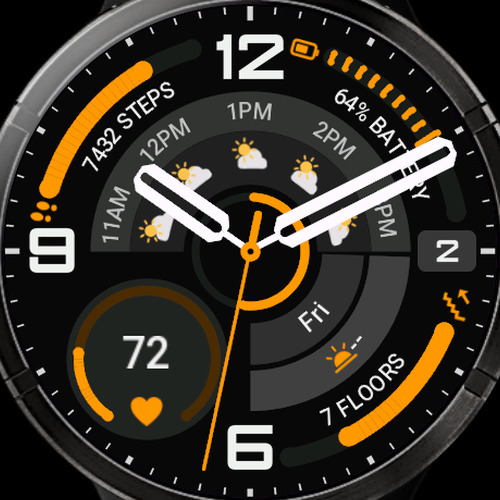
Ultra Watch 2 – a classic analog watch face that shows everything you care about, without the clutter.
The idea is simple: a clean, sharp dial with real hands, and all your data placed neatly around it. You decide what you see – and if you want nothing at all, switch everything off and enjoy a pure, minimalist analog look.
WHAT YOU SEE AT A GLANCE
– Three curved progress arcs – left, top right and bottom right. Pick from 20+ metrics: steps, heart rate, watch battery, Body Battery, stress, calories, distance, floors climbed, active minutes, Pulse Ox, humidity, rain chance, temperature, UV index, recovery time, sleep score, solar intensity, daylight, and day / week / month progress. The text follows the curve of the dial.
– Weather forecast band – the next hours or days with icons, temperature, rain chance, wind, humidity or daily min/max. Choose a step of 1, 2 or 3 hours.
– Two data lines on the right with icons – 38 options, including resting heart rate, respiration, VO2 max, altitude, barometer, feels-like temperature, wind, notifications, alarms, sunrise/sunset, a second time zone, moon phase and date.
– Left circle – show your favourite metric as a progress ring, as a small dial with a label, or turn it off.
– Center ring – a sweeping seconds ring, a progress ring for any metric, or nothing.
– Date always on the right side.
MAKE IT YOURS
– Three color styles: Classic, Dark + Solid Accent and Dark + Gradient Accent.
– 9 color themes and 24 accent colors, plus separate colors for the numerals, the index, the text and each hand.
– 5 background tones.
– Two hand styles – Classic or Skeleton – with the second hand on or off.
– Text size: Standard or Large, for easier reading.
– Every field you turn off disappears completely, including its background.
ALWAYS-ON DISPLAY
On AMOLED watches you get a real always-on mode: data is softly dimmed to save battery, while the hands stay bright and easy to read.
MIP WATCHES
On fēnix 7, fēnix 8 Solar, fēnix 9 Pro Solar, Enduro 3 and Forerunner 955 the face is tuned for the MIP display – adjusted colors, larger and sharper text, and system-drawn curved fonts.
SMALL THINGS THAT HELP
– Tap a field to open the matching Garmin widget.
– Change settings right on the watch or in the Connect IQ app on your phone.
– Units (metric/imperial) and 12/24-hour time follow your watch settings.
Some metrics depend on your watch model and its sensors – if your watch doesn’t support a function, it simply won’t be offered in the settings.
BUY ONE, GET ONE FREE
Buy Ultra Watch Pro and get a second watch face for free:
Join our community:
Questions, ideas or something not working? Write to us – we answer quickly and keep improving our watch faces:
Details
- Downloads
- 100+
- Rating in Connect IQ
- 4.6 ★ (17)
- Version
- 1.3
- Updated
- 6 Oct 2026
Comments 0