
Share your look
A short video or a photo of our watch face on your wrist.
⌚ On ·
By sending, you confirm it’s your own video or photo and that we may show it on Garmin Face Hub and our social media. Terms
Preparing…
Keep this page open.
Loading…
About this watch face
For another sleek and fully customizable experience, discover Dominus XSquare:
https://apps.garmin.com/apps/8f68c39b-cb1d-4946-bd37-6ffc50924055
NOTE – Color presets:
After you pick a preset (e.g. Neon) and save, the watch face updates right away. Individual color lists in Connect may refresh only after you reopen settings — that’s a Connect limitation.
To tweak one color from a preset: reopen settings, change that color, and save. The face keeps the rest of the preset, and Color preset switches to Custom automatically. To edit several colors in one go, set Color preset to Custom first.
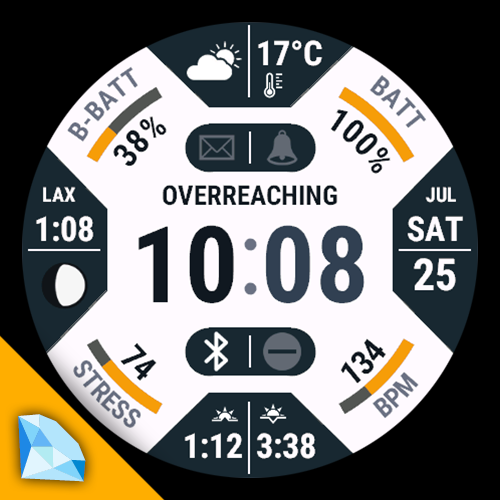
A fully customizable layout watch face built around four trapezoid complication zones, four corner radial gauges, dual dot capsules, and a center banner — with deep color control and 10 curated color presets.
TRAPEZOID METRICS (4×2 zones, 58 metrics)
Time & calendar: 2nd time zone · day in month · weekday (short) · month (short) · day + weekday · day + month · weekday + month · month + weekday · week number · day of year · year · next event
Watch & system: watch battery (%) · watch battery (days) · solar intensity · notifications
Weather & environment: weather icon · temperature · feels like · max temperature · min temperature · humidity · precipitation · wind speed · wind direction · sunrise · sunset · barometric pressure · barometric trend · altitude · UV index · moon phase · internal sensor temperature
Daily activity: steps · distance · floors climbed · active minutes · wheelchair pushes
Weekly activity: weekly active minutes · weekly run / bike / swim / walk distance · weekly run / bike / swim / walk minutes
Health & fitness: heart rate · calories (total) · active calories · Body Battery · recovery time · stress · Pulse Ox · respiration rate · VO2 max (running) · VO2 max (cycling) · weight
CORNER METRICS (4 zones, 22 metrics)
Watch battery (%) · watch battery (days) · steps · steps to go · daily distance · floors climbed · weekly active minutes · weekly run distance · weekly bike distance · weekly swim distance · weekly walk distance · weekly run minutes · weekly bike minutes · weekly swim minutes · weekly walk minutes · heart rate · calories (total) · active calories · Body Battery · stress · recovery time · Move bar
DOT CAPSULE METRICS (4 slots, 24 metrics)
Watch battery (%) · watch battery (days) · day in month · week number · respiration rate · notification count · UV index · Body Battery · VO2 max (running) · VO2 max (cycling) · sleep score · AM/PM / 24H indicator · live seconds · phone connection (status icon) · Do Not Disturb (status icon) · touch mode (status icon) · GPS activity (status icon) · alarm (status icon) · notification (status icon) · moon phase · weather icon · wind direction · barometer trend · Move bar
CENTER BANNER
Weather text · weekday (long) · month (long) · training status
CUSTOMIZATION
• 10 color presets
• 20 individual color slots (face, clock digits, separator, banner, trapezoids, dots, corner arcs, separate ink colors)
• 24 palette swatches per color slot
• On-device color preset menu
Display
• 6 time fonts (system default + 5 styles)
• 12h / 24h / follow watch
• Clock separator: none · colon · bar
• Optional leading zero on hour
• Optional trap icons instead of text labels
Units
• Temperature: follow watch · °C · °F
• Distance: follow watch · meters · kilometers · miles · yards
• Wind: follow watch · m/s · km/h · mph · knots
• Pressure: follow watch · hPa · mbar · mmHg · inHg · atm
• Altitude: follow watch · meters · feet
• Weight: kg · lb
• Recovery time: minutes · hours
• Goal distance input: meters · km · miles · yards
Goals & progress
Configurable targets for steps, daily distance, floors, weekly sport distances & minutes, heart rate, calories (total/active), and recovery time — used by corner arcs and compatible metrics.
Not sure, try the free version first: https://apps.garmin.com/apps/35d1ee67-68c9-4f10-b499-f7ec53ea7487
Details
- Downloads
- 100+
- Rating in Connect IQ
- 3.7 ★ (33)
- Version
- 1.4.0
- Updated
- 9 Nov 2026
Works on
Garmin Fenix 9 · Garmin Fenix 8 · Garmin Fenix E · Garmin Fenix 7 · Garmin Epix Pro · Garmin Epix Gen 2 · Garmin Forerunner 970 · Garmin Forerunner 965 · Garmin Forerunner 955 · Garmin Forerunner 570 · Garmin Forerunner 265 · Garmin Forerunner 170 · Garmin Forerunner 165 · Garmin Forerunner 70 · Garmin Venu 4 · Garmin Venu 3 · Garmin Venu X1 · Garmin Vivoactive 6 · Garmin Enduro 3 · Garmin Enduro 2 · Garmin Tactix 8 · Garmin Tactix 7 · Garmin MARQ Gen 2 · Garmin D2 Mach · Garmin D2 Air X · Garmin Descent Mk3 · Garmin Approach S70
Comments 0