Share your look
A short video or a photo of our watch face on your wrist.
⌚ On ·
By sending, you confirm it’s your own video or photo and that we may show it on Garmin Face Hub and our social media. Terms
Preparing…
Keep this page open.
Loading…
About this watch face
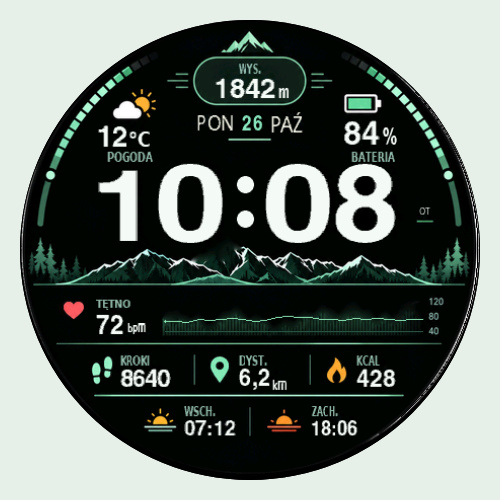
TATRA SIGNAL combines a mountain panorama with mint-green accents and a strong digital clock. Altitude, weather temperature and battery frame the upper view, while heart rate, steps, distance and total calories sit below the time. Sunrise and sunset readings complete the layout. The dark background and restrained alpine palette give the dial a calm outdoor character. Its careful spacing lets the mountain scene and everyday information share the display without losing their individual places.
Daily information
– Heart rate, steps, daily distance and total calories
– Altitude, battery level and weather temperature
– Sunrise and sunset times
A heart-rate history trace adds context to the current reading when the watch provides recorded samples.
Settings and display
Switch between Polish and English. Choose metric or imperial units and system, 24-hour or 12-hour time. Seconds while the screen is awake can be switched on or off. The carefully arranged layout is fixed.
On supported AMOLED watches, a minimal Always On clock uses a black background and changes position over time. Enable Always On in both the watch system and the face settings. This view does not animate seconds. Color MIP devices retain the full face during sleep; behavior depends on the device and system settings.
Data and compatibility
Readings depend on Garmin data and the sensors supported by your watch. Weather uses Garmin’s synchronized cache; sunrise and sunset use the weather observation location. Missing or stale values appear as –. Check the official compatible-device list on this store listing for your exact model.
Trial and activation
The one-hour trial starts at first launch and continues during standby and while you are away from this face. After the trial, permanent activation is tied to the Install ID of this individual watch face. Copy the complete Install ID and visit the relevant product page at https://watch.jiaji.ca or contact Oriental Time. Enter the supplied activation code in the watch face settings, keeping all leading zeroes.
WeChat / LINE: CyberTecher2026
Preview images use sample data.
Details
- Downloads
- 1+
- Version
- 1.0.0
- Updated
- 3 Nov 2026
Works on
Garmin Fenix 9 · Garmin Fenix 8 · Garmin Fenix E · Garmin Fenix 7 · Garmin Fenix 6 · Garmin Epix Pro · Garmin Epix Gen 2 · Garmin Forerunner 970 · Garmin Forerunner 965 · Garmin Forerunner 955 · Garmin Forerunner 570 · Garmin Forerunner 265 · Garmin Forerunner 255 · Garmin Forerunner 170 · Garmin Forerunner 165 · Garmin Forerunner 70 · Garmin Venu 4 · Garmin Venu 3 · Garmin Venu 2 · Garmin Venu X1 · Garmin Vivoactive 6 · Garmin Vivoactive 5 · Garmin Instinct 3 · Garmin Instinct Crossover · Garmin Enduro 3 · Garmin Enduro 2 · Garmin Tactix 8 · Garmin Tactix 7 · Garmin MARQ Gen 2 · Garmin D2 Mach · Garmin D2 Air X · Garmin Descent Mk3 · Garmin Descent G2 · Garmin Approach S70 · Garmin Approach S50
Comments 0