Share your look
A short video or a photo of our watch face on your wrist.
⌚ On ·
By sending, you confirm it’s your own video or photo and that we may show it on Garmin Face Hub and our social media. Terms
Preparing…
Keep this page open.
Loading…
About this watch face
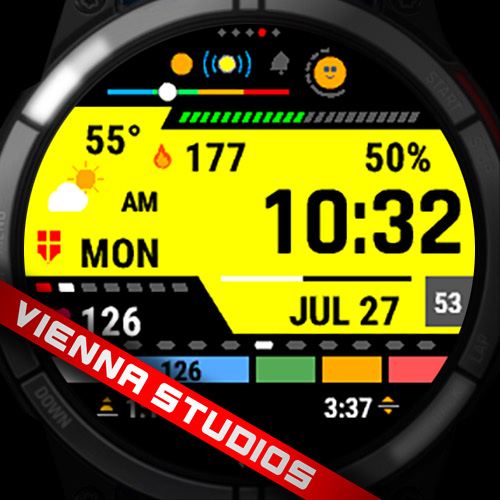
A digital watch face built around a wide display panel across the middle of the
screen, painted as a left-to-right colour gradient. Text sitting on the panel is
black; text outside it is white. Everything on the dial is drawn from vector
primitives, so it renders at the native resolution of each watch.
TIME
– Large digit font, sized by the watch itself.
– Black on the panel; white in Dark Mode.
– Time format: watch default, 12h, 12h with leading zero, 24h, or military.
– AM/PM is shown in 12-hour mode only.
– Optional seconds on their own grey plate. They tick once a second while the
watch is awake and read as dashes in low power.
PANEL AND COLOUR
– Display Color A (left) and Display Color B (right) set the panel gradient,
each from twelve colours: white, light gray, light blue, blue, mint, light
green, green, yellow, orange, red, pink, purple.
– Display Gradient can be switched off, leaving a flat panel in Color B.
– Dark Mode removes the panel and leaves the readings on the black background.
– On 64-colour MIP screens the gradient is drawn in a few deliberate steps,
snapped to the colours those screens can show.
DATA
– Five data slots, each showing one of 20 readings with a matching icon: steps,
calories, distance, heart rate, resting heart rate, Body Battery, stress,
altitude, VO2 max, floors (total, climbed, descended), active minutes (day,
week, moderate), notifications, battery in days, sunrise, sunset, week number.
– Readings that depend on a sensor, or on data the watch has not gathered yet,
show two dashes. Readings the watch cannot provide at all are not drawn.
– Day of week, date and battery percentage.
WEATHER
– Current condition as one of twelve icons, with day and night variants, plus the
temperature.
– A temperature bar places a marker between the day’s low and high.
– Weather comes from the Garmin Connect app, so it appears after the watch has
synced at least once.
– Not available on watches running Connect IQ 3.2 or older. There the icon,
temperature and bar are hidden rather than shown empty.
INDICATORS (each can be switched off where noted)
– Heart-rate zone bar: five blocks in the Garmin zone colours. The current zone
is widened and carries the live heart rate.
– Move bar (optional): a segmented ring with a face that follows how long you
have been inactive.
– Bluetooth dot, alarm bell (grey when none is set, red when one is) and
notification dot (grey when none, orange when there are notifications). Each is
optional.
– Day-of-week strip of seven segments, filled up to today, with Sunday marked.
– Battery strip of 23 segments.
– Month strip of twelve segments, with the current month lit.
– Day progress bar, filling from midnight to midnight.
– Dot row (optional animation): five dots in which one red dot steps once a
second, bouncing from end to end.
– Studio logo (optional).
ALWAYS-ON DISPLAY (AMOLED watches)
– Low power shows the time only, in white on black, shifted a few pixels each
minute to spread the load on the panel.
– An optional date line can be added underneath.
– This row does not appear in the settings on MIP watches, which stay visible
without an always-on mode and keep drawing the full face.
UNITS
– Temperature in Celsius or Fahrenheit, or follow the watch setting.
– Distance in metric or imperial, or follow the watch setting.
SETTINGS
– All settings are in the Garmin Connect phone app.
– Watches on Connect IQ 5.0 and newer also have an on-watch settings menu that
writes the same values.
PERMISSIONS
– Positioning: weather, sunrise and sunset.
– Sensor History: Body Battery and stress.
– User Profile: VO2 max, resting heart rate and heart-rate zones.
– The face does not record, store or transmit any personal data.
Details
- Downloads
- 100+
- Rating in Connect IQ
- 5.0 ★ (2)
- Version
- 1.1
- Updated
- 5 Oct 2026
Works on
Garmin Fenix 9 · Garmin Fenix 8 · Garmin Fenix E · Garmin Fenix 7 · Garmin Fenix 6 · Garmin Epix Pro · Garmin Epix Gen 2 · Garmin Forerunner 970 · Garmin Forerunner 965 · Garmin Forerunner 955 · Garmin Forerunner 570 · Garmin Forerunner 265 · Garmin Forerunner 255 · Garmin Forerunner 165 · Garmin Venu 4 · Garmin Venu 3 · Garmin Venu 2 · Garmin Vivoactive 6 · Garmin Vivoactive 5 · Garmin Instinct 3 · Garmin Instinct Crossover · Garmin Enduro 4 · Garmin Enduro 3 · Garmin Enduro 2 · Garmin Tactix 8 · Garmin Tactix 7 · Garmin MARQ Gen 2 · Garmin D2 Mach · Garmin D2 Air X · Garmin Descent Mk3 · Garmin Descent G2 · Garmin Approach S70 · Garmin Approach S50
Comments 0